A visual Mac window switcher for choosing one exact window
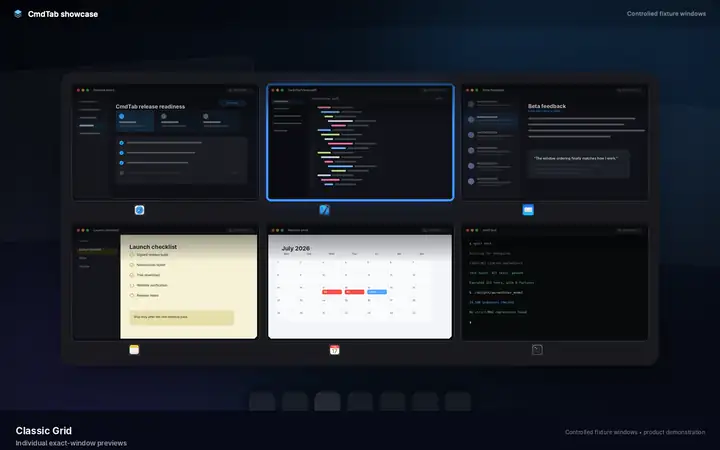
Classic Grid presents eligible windows as separate tiles in the same global exact-window sequence used by every CmdTab mode. It is designed for people who identify work visually before they identify it by title.
Classic Grid is CmdTab’s thumbnail-oriented presentation mode. It does not group every window from one application into one tile: each eligible window remains its own target and can appear anywhere in the global recent-use order.
Classic Grid
Classic Grid exact-window preview
A sharp HD product poster shows separate exact-window cards, preview styling, and the selected-state treatment used by Classic Grid.
Classic Grid shows each eligible window as a separate target; a missing capture changes the tile presentation, not membership. Source: HD deterministic product poster. Controlled fixture windows protect private desktop content; the Evidence page records the separate signed-app acceptance boundary.
Current behavior
What this feature does today
These statements describe the current implementation and are intentionally narrower than an unmeasured performance claim.
Behavior
Current CmdTab contract
Unit of selection
One eligible top-level window per target
Ordering
One exact-window recent-use sequence across applications
Same-app windows
Remain separate and may be interleaved with other applications
Current exact window
Remains visible at the end of the cycling sequence
Preview failure
Uses an icon or placeholder without removing the eligible window
Selection movement
Follows adjacent targets in the displayed sequence
Decision guide
Where it fits, and where another mode is better
A useful feature page should state the tradeoff instead of treating every workflow as proof of superiority.
Best fit
You recognize the right document, terminal, browser, or chat window faster from its appearance than its title.
Several applications have multiple windows and an app icon alone is not enough to identify the target.
You want the current exact-window recency order to remain visible while scanning.
Tradeoffs and limits
A dense visual grid requires more scanning than a text query when you already know the app or window title.
Live previews depend on Screen Recording access, although eligible windows remain represented when capture is unavailable.
The page does not claim a fixed reveal latency or thumbnail-render benchmark; those require real-machine measurement.
Continue
Choose the next source by the problem you need to solve