CmdTab app icon

CmdTab

macOS window switching

Menu

Product showcase

See CmdTab move, search, and reflow

The showcase combines an authentic production Radial Menu render with deterministic product composites for the other current surfaces. Controlled fixture windows make every asset privacy-safe and reproducible.

Last reviewed:

Radial Menu is an authentic render of CmdTab’s production SwiftUI/AppKit view. The overview and Quick Actions clips, plus the Classic Grid and Command Palette posters, are deterministic product composites based on the current production geometry, styling, item model, and documented behavior contract. All media uses controlled fixture windows, is not AI-generated, and does not record a private desktop.

Overview

CmdTab app switcher overview

A short deterministic product composite introduces Classic Grid, Command Palette, Radial Menu, and Quick Actions using the current interface geometry and controlled fixture windows.

Deterministic product composite

Read the media description

The clip opens on Classic Grid and moves the selected exact-window tile. It changes to Command Palette and narrows the visible fixture set with a local query. It then presents the Radial Menu before ending with a selected fixture target leaving the grid after a Quick Action annotation.

Evidence boundary

This showcase demonstrates current presentation and interaction concepts. It does not prove signed-app Accessibility, Screen Recording, Space, display, fullscreen, signing, notarization, or exact focused-window acceptance; those remain separately documented on the Evidence page.

Review test evidence

Mode media

A useful demonstration for every production surface

Animated clips are used where validated motion is available; polished posters are used where a static view communicates the current interface more honestly. Every item has a stable URL and a visible source label.

Classic Grid

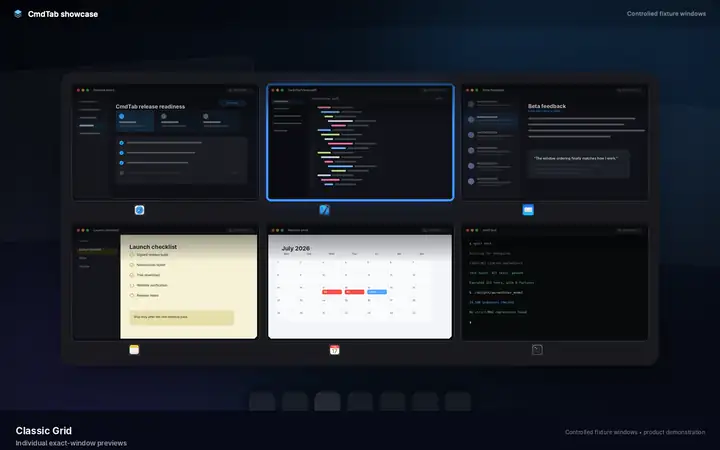
Classic Grid exact-window preview

Poster

A deterministic product poster shows separate exact-window cards, real-preview styling, and the selected-state treatment used by Classic Grid.

Deterministic product poster

Read the media description

The poster depicts six controlled fixture windows as separate thumbnail cards. A blue outline identifies the selected exact-window target without grouping the cards by application.

Item 01

Classic Grid exact-window preview

A deterministic product poster shows separate exact-window cards, real-preview styling, and the selected-state treatment used by Classic Grid.

Poster
720 × 450
Format
WebP poster
Source
Deterministic product poster

Command Palette

Command Palette local window search

Poster

A deterministic product poster shows the current search layout, controlled fixture results, and selected-row treatment used by Command Palette.

Deterministic product poster

Read the media description

The poster depicts the local search field and a filtered fixture-window list. The selected result uses the current blue outline and return-key affordance.

Item 02

Command Palette local window search

A deterministic product poster shows the current search layout, controlled fixture results, and selected-row treatment used by Command Palette.

Poster
800 × 500
Format
WebP poster
Source
Deterministic product poster

Radial Menu

Radial Menu directional selection

An authentic production SwiftUI/AppKit render shows the circular selector moving its highlighted exact-window target around the shared radial viewport.

Authentic production SwiftUI render

Read the media description

Eight controlled fixture-window targets appear around the production Radial Menu. The selected ring, arrow, and center details advance around the circle to demonstrate directional selection.

Item 03

Radial Menu directional selection

An authentic production SwiftUI/AppKit render shows the circular selector moving its highlighted exact-window target around the shared radial viewport.

Poster
800 × 500
Format
Silent H.264 MP4 + WebP
Duration
4.8 seconds
Source
Authentic production SwiftUI render

Quick Actions

Quick Actions selected-item mutation

A deterministic product composite shows a selected fixture target leaving the grid after a capture-only Command-W annotation.

Deterministic product composite

Read the media description

A controlled fixture window is selected in the grid. A capture-only Command-W badge explains the close action. The selected target leaves and the remaining fixture cards reflow.

Item 04

Quick Actions selected-item mutation

A deterministic product composite shows a selected fixture target leaving the grid after a capture-only Command-W annotation.

Poster
720 × 450
Format
Silent H.264 MP4 + WebP
Duration
3.6 seconds
Source
Deterministic product composite