Search open Mac windows by app name or window text
Command Palette uses the same eligible-window set and exact-window recency sequence as Classic Grid, then narrows it with deterministic local matching when you type.
CmdTab Command Palette is a keyboard-first window-search mode. It matches application and window text, supports acronym-style queries, and can promote a previously chosen result when its relevance remains close to the strongest match.
Command Palette
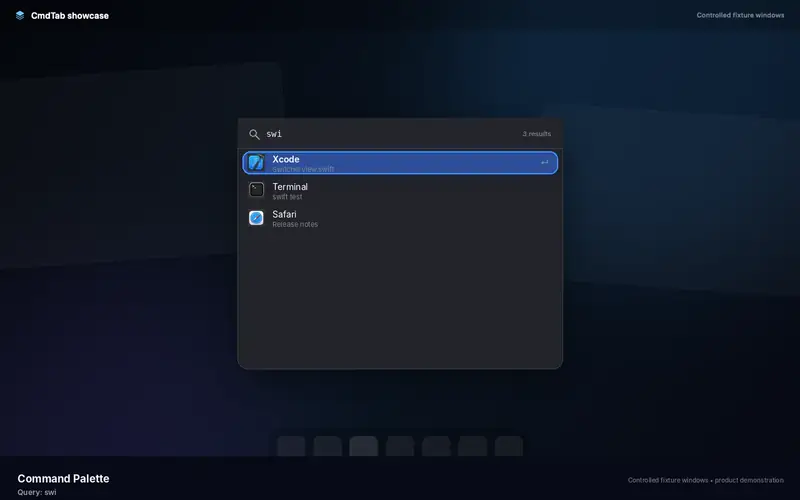
Command Palette local window search
A sharp HD product poster shows the current search layout, controlled fixture results, and selected-row treatment used by Command Palette.
Command Palette narrows the current exact-window sequence by application and window text without sending the raw query in the current telemetry payload. Source: HD deterministic product poster. Controlled fixture windows protect private desktop content; the Evidence page records the separate signed-app acceptance boundary.
Current behavior
What this feature does today
These statements describe the current implementation and are intentionally narrower than an unmeasured performance claim.
Behavior
Current CmdTab contract
Search fields
Application name and window title
Matching
Space-insensitive local similarity plus acronym and word-start signals
Empty query
Preserves the current exact-window sequence
Ties
Stable source order is preserved when relevance scores are equal
Remembered choice
May promote a prior stable target when its relevance remains close to the best match
Current telemetry
Does not include raw search queries
Decision guide
Where it fits, and where another mode is better
A useful feature page should state the tradeoff instead of treating every workflow as proof of superiority.
Best fit
You already know part of an application name, document title, project name, or acronym.
You repeatedly return to similarly named windows and want the selected result to remain predictable.
Your desktop has too many visually similar windows for thumbnail scanning alone.
Tradeoffs and limits
Search quality depends on the window titles and application names exposed by macOS and the running app.
Remembered selection is a bounded tie-break signal, not an opaque model that overrides clearly stronger text matches.
The current product does not claim cloud semantic search or AI query interpretation.
Continue
Choose the next source by the problem you need to solve